You’re wearing five hats today: grant writer, event planner, donor steward, social media manager, and somehow you still need to figure out why donations are down this quarter. Sound familiar?
You’ve probably been hearing about AI constantly. Maybe you’re curious but haven’t taken the leap yet. Or maybe you tried it once and weren’t sure what to do with it. The gap between “AI exists” and “AI helps me do my actual job” can feel pretty wide.
The good news? Thousands of nonprofits are already using AI in practical, everyday ways that actually make a difference. Not as some futuristic transformation, but as a helpful tool that handles routine tasks while you focus on mission-critical work. And getting started is more straightforward than the buzz would suggest.
Let’s cut through the hype and look at six practical ways you can start using AI this week to work smarter, not harder.
1. Polish Your Fundraising Appeals in Minutes
The Problem
You’ve drafted an appeal letter, but you’re not sure if the tone is right. Is it too formal? Not compelling enough? Will it resonate with your donors? Normally you’d send it to three colleagues for feedback and wait days for responses. Meanwhile, your campaign deadline is approaching.
The AI Solution
AI writing tools can help you refine your appeals quickly. Think of AI as your always-available first editor. It can adjust tone, check grammar, suggest stronger calls-to-action, and even generate multiple versions for A/B testing.
Practical Example
Let’s say you’ve written this opening line:
“We are writing to request your support for our annual fundraising campaign.”
You can ask AI: “Make this warmer and more personal.” It might suggest:
“Your past support has made such a difference in our community. Today, I’m reaching out to ask if you’ll join us again in changing lives.”
Or if you want to test urgency, ask AI to “strengthen the urgency in this appeal,” and you might get:
“Right now, families in our community are facing a crisis, and your immediate support can help us reach them before it’s too late.”
Pro Tip
AI is your first draft editor, not your replacement. Always add your personal touch, specific stories from your organization, and mission-specific details that only you know. The heart of your message should always come from you.
2. Repurpose Content Across Channels (Without Starting from Scratch)
The Problem
You wrote a great newsletter article about your recent program success. Now you need to create social media posts, an email snippet for your weekly update, a version for your website blog, and talking points for your next board meeting. Manually adapting content for each platform is time consuming and tedious.
The AI Solution
AI excels at transforming one piece of content into multiple formats instantly. Write once, publish everywhere with AI handling the adaptation for different platforms and audiences.
Practical Example
You have an 800-word article about a successful literacy program. You can ask AI:
“Take this article and create:
- Five social media posts for Facebook and Instagram
- A 200-word email version for our weekly newsletter
- Three key bullet points for our board presentation
- A 150-word version optimized for our website”
Within minutes, you have content ready for every channel. Each version maintains your core message while being optimized for its specific platform. Your Instagram posts might be more visual and casual, your board bullets more data-focused, and your email version conversational and action-oriented.
Pro Tip
Create a “content multiplication workflow.” Write one strong, comprehensive piece each month, then use AI to adapt it for four to five channels. This approach ensures consistent messaging while dramatically reducing your content creation time.
3. Uncover Hidden Insights in Your Donor Data
The Problem
You have years of donation data sitting in your nonprofit CRM. You know there are valuable patterns hiding in there: which donors are most likely to give again, who might be ready to upgrade their giving, which of your contacts are truly engaged with your mission. But creating the right reports to answer these questions takes time. You need to remember which fields to filter, how to set up the query, and then interpret the results.
Traditional reports show you what happened, like total donations or number of gifts. But getting to the deeper questions like “who should I focus on” and “what’s really driving our results” questions require building complex reports and spending time analyzing the data.
The AI Solution
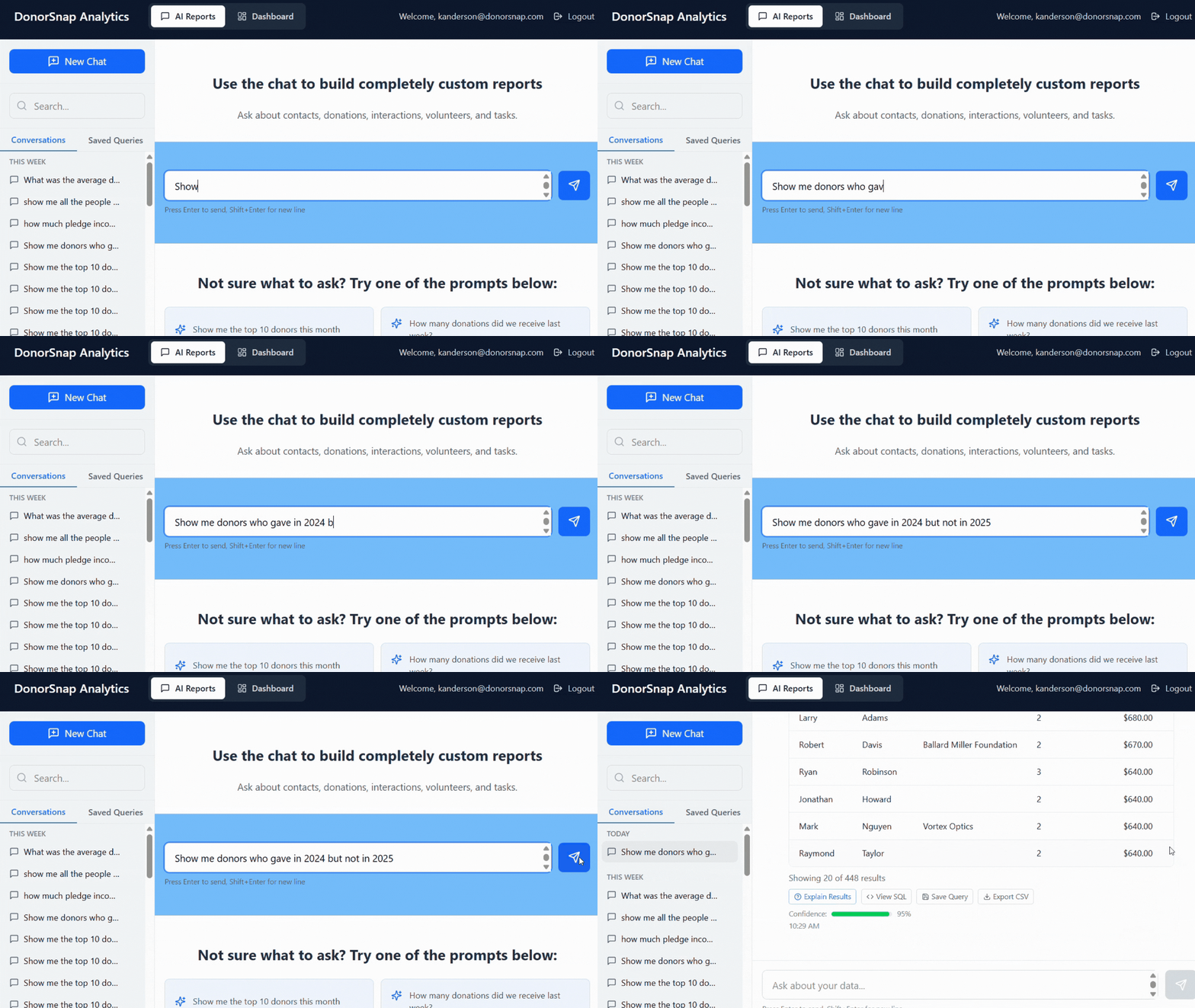
AI-powered data analysis tools can generate reports for you based on simple questions. Instead of learning query builders and filter logic, you ask questions in plain English and get the report you need instantly.
This is where tools like DonorSnap Analytics (coming soon!) transform how nonprofits work with their data.
How It Works
Instead of building reports manually, you simply ask questions:
- “Who are our most engaged contacts?”
- “Who is most likely to move up a giving level?”
- “Show me donors who gave last year but haven’t given this year.”
- “Which donors have been giving consistently for more than 3 years?”
DonorSnap Analytics generates the report for you, saving you the time of setting up filters, selecting fields, and configuring the output. The data was always in DonorSnap, but now you can access it through conversation instead of complex query building.
What Makes This Different
Reports generated instantly. Questions that used to require five steps of filtering and report configuration now happen in seconds. Ask the question, get the report. No need to remember which fields connect to which or how to structure your query.
Complex analysis made simple. Want to understand engagement patterns across multiple factors? Instead of creating multiple reports and cross-referencing them manually, you can ask: “Who are our most engaged contacts?” The AI analyzes donation frequency, recency, email engagement, and other relevant factors to give you a comprehensive answer.
More time for strategy, less time building reports. When generating reports takes seconds instead of thirty minutes, you can ask more questions. You can explore your data, test theories about donor behavior, and make decisions based on actual insights rather than gut feelings or the limitations of pre-built reports.
Real Scenario
You want to identify donors to contact about upgrading their giving. In the past, you’d need to:
- Open your report builder
- Set filters for donation history
- Add filters for engagement metrics
- Configure which fields to display
- Run the report and interpret the results
- Maybe build a second report to cross-reference
With DonorSnap Analytics, you simply ask: “Who is most likely to move up a giving level?” and get your answer with context about why these donors were identified.
Or maybe you’re preparing for a board meeting and need to understand retention trends. Instead of spending time building year-over-year comparison reports, you ask: “How has our donor retention changed over the past three years?” and get the analysis you need immediately.
Pro Tip
The power of AI-driven reporting is that you can ask follow-up questions naturally. If a report shows something interesting, you can immediately dig deeper: “Show me more details about donors in that group” or “Break this down by donation amount.” You’re having a conversation with your data instead of running a series of predetermined reports.
Ready to stop spending hours building reports? DonorSnap Analytics brings AI-powered report generation to nonprofits of all sizes. Your data is already in DonorSnap, now you can access it by simply asking questions. Generate reports instantly, answer complex questions without manual data analysis, and spend your time on strategy instead of spreadsheets. Learn more about DonorSnap Analytics here.
4. Troubleshoot Technical Issues Without a Developer
The Problem
Your email template is broken and showing weird formatting on mobile devices. You need custom HTML for your donation page but don’t know code. Your website has a minor issue that would cost $200 to have a developer fix. You’re stuck waiting on IT help or burning precious budget on consultants for what might be small fixes.
For small nonprofits without dedicated tech staff, these roadblocks can delay campaigns, frustrate donors, and drain resources.
The AI Solution
AI can write code, debug technical issues, and explain tech problems in plain English. Think of it as a 24/7 technical consultant for common nonprofit technology challenges.
Practical Examples
Email formatting issues: “This HTML email template isn’t displaying correctly on mobile devices. The image is too large and the text is overlapping. Here’s my code: [paste code]. Can you identify the problem and fix it?”
AI can review your code, identify the issue (maybe missing responsive design tags), and provide corrected code with an explanation of what was wrong.
Website fixes: “My donation button on our WordPress site isn’t working. When people click it, nothing happens. How do I troubleshoot this?”
AI can walk you through common causes: JavaScript conflicts, plugin issues, button linking problems, and how to test each one.
Custom code creation: “Write me HTML code for an email header that includes our logo at [URL], is mobile-responsive, and uses our brand colors #003366 for the background and #FF6B35 for accent text.”
Within seconds, you have working code ready to implement.
Safety Note
Always test technical fixes in a safe environment first. If you’re dealing with payment processing, donor data security, or complex integrations, consult with a professional. AI is excellent for common fixes and learning, but critical systems deserve expert oversight.
Pro Tip
Be specific when asking AI for technical help. Include error messages, describe exactly what you see happening, and provide relevant code or settings. The more context you give, the better the solution you’ll receive.
5. Generate Grant Proposals and Reports Faster
The Problem
Grant applications require slightly different versions of the same information. You’re copy-pasting from old grants and manually adjusting language, emphasis, and format for each new opportunity. Program reports need the same data presented differently for different funders. It’s tedious, time-consuming work that pulls you away from actual program delivery and relationship building.
The AI Solution
AI can help draft grant narratives, adapt existing content to new requirements, and format program data for different audiences. It speeds up the initial draft so you can focus on the unique, compelling details that only you can provide.
Practical Examples
Adapting organizational content: “Here’s our standard organization overview. Rewrite it to emphasize our impact on youth education for this Department of Education grant, keeping it under 500 words.”
Turning data into narrative: “Turn these program statistics into a compelling narrative for our annual report: We served 150 students, 92% improved their reading level by at least one grade, 85% of parents reported increased confidence in supporting their child’s learning.”
Answering grant questions: “I need to answer this grant question: ‘Describe how your program addresses equity and inclusion.’ Here’s information about our program: [paste details about free services, multilingual support, outreach to underserved communities]. Draft a 500-word response.”
Creating variations for different audiences: “Create three different versions of our mission statement: one for corporate funders focusing on workforce development, one for foundation grants emphasizing community impact, and one for individual donors highlighting personal transformation.”
Important Caveat
AI creates first drafts only. You must personalize with specific stories, local data, relationships with the funder, and your organization’s authentic voice. Never submit AI-generated content without thorough review, fact-checking, and customization. Grant reviewers can often spot generic AI content, and it won’t serve your application well.
Pro Tip
Build a “grant library” document containing all your standard content: mission statement, program descriptions, impact data, staff bios, organizational history, and past success stories. When you need to draft a new grant application, provide this library to AI as context. This ensures consistency and gives AI the right information to work with.
6. Improve Donor Communications with Personalization at Scale
The Problem
You know personalized communications work better than generic mass messages. Donors want to feel seen and valued as individuals. But you can’t hand-write 500 different thank-you messages or create entirely different campaigns for each donor segment. You’re one person (or a small team) managing hundreds or thousands of relationships.
Major donors should receive different messaging than first-time donors. Long-time supporters deserve recognition for their loyalty. Lapsed donors need different language than active ones. But creating all these variations manually is overwhelming.
The AI Solution
AI can help you create multiple versions of communications tailored to different donor segments, maintaining your core message while adjusting tone, emphasis, and details for different audiences.
Practical Examples
Segmented thank-you messages: “Take this thank-you email and create four versions for: long-time monthly donors (giving 3+ years), first-time donors, major gift donors ($1,000+), and lapsed donors we’re re-engaging.”
Each version maintains gratitude but emphasizes different aspects:
- Major donors get recognition of their leadership and the specific impact of larger gifts
- First-time donors get welcome language and explanation of where their gift goes
- Monthly donors get appreciation for their consistent partnership
- Lapsed donors get “we’ve missed you” messaging that acknowledges the gap without guilt
Event follow-ups: Create different follow-up emails for event attendees based on their relationship with your organization: first-time attendees, regular volunteers, board members, sponsors, and guests who haven’t yet donated. Learn more about event attendee followup and cultivation here.
Year-end campaigns: Generate campaign messages that reference each donor’s giving pattern: “Last year you gave in November…” or “As a monthly donor, you’ve already made such a difference this year…” or “We haven’t heard from you since 2023, but we’d love to welcome you back…”
The Human Touch
Remember, AI helps you create the variations, but you should still add personal touches where possible. Add a handwritten P.S. to major donor letters. Reference specific conversations in your emails. Use AI for efficiency, not to eliminate the personal connection.
Pro Tip
Start with three to four key donor segments based on giving behavior: new donors, loyal donors, major donors, and lapsed donors. Create template variations for each segment, then refine based on results. You can always get more sophisticated as you learn what works.
Start Small, Think Big
AI can’t replace your passion, creativity, or mission knowledge. However, it can give you back the time to focus on what humans do best: building relationships, solving complex problems, and driving your mission forward.
The Bottom Line
Small nonprofits have always been scrappy and resourceful, finding creative ways to do more with less. AI is just your newest tool in that toolkit, one that’s finally accessible, practical, and designed to help you amplify your impact.
The question isn’t whether AI will change nonprofit work. It already has. The question is: will you harness it to work smarter, or will you keep spending your valuable time on tasks that could be automated?
Your mission is too important to waste time on work that technology can handle. Start exploring these six practical applications today, and discover how much more you can accomplish when AI handles the repetitive tasks while you focus on changing lives.
Getting Started: AI Tools to Explore
- ChatGPT (OpenAI) – Great for writing and brainstorming
- Claude (Anthropic) – Excellent for longer documents and analysis
- Google Gemini – Integrates with Google Workspace
- Microsoft Copilot – Helpful for Office 365 users
- Grammarly – Free version includes AI writing assistance
- DonorSnap Analytics (Coming Soon!) – Great for securely analyzing your fundraising data
AI Ethics for Nonprofits: Quick Guidelines
Protect donor privacy: Never put personally identifiable donor information (names, addresses, donation amounts) into public AI tools.
Always review and edit: AI-generated content should never go out without human review. Check facts, add authenticity, and ensure accuracy.
Be transparent when appropriate: For major communications or public-facing content, consider whether transparency about AI assistance is appropriate for your audience.
Maintain authentic relationships: Use AI to enhance efficiency, not to replace genuine human connection with donors, volunteers, and community members.
Follow data governance standards: Ensure any AI tools you use comply with data protection regulations and your organization’s privacy policies.