Why a polished email matters
Email is still one of the most effective ways for nonprofits to reach supporters. M+R Benchmarks 2026 found that nonprofit email revenue grew 16% in 2025, with organizations raising an average of $54 for every 1,000 fundraising emails sent. Each subscriber brought in $2.40, up from $1.87 the year before.
Supporters like it that way. 48% of donors say email is their preferred way to hear from the causes they care about, more than double the share who choose direct mail.
But a good email has to do more than land in the inbox. Supporters notice the details. When an email reads cleanly and every button works, it tells them your organization is careful with their gift. When the donate button goes nowhere or the layout falls apart in Outlook, it tells them something too.
Campaign Studio is DonorSnap’s new email builder, made to help you get those details right from the first draft to the final report.
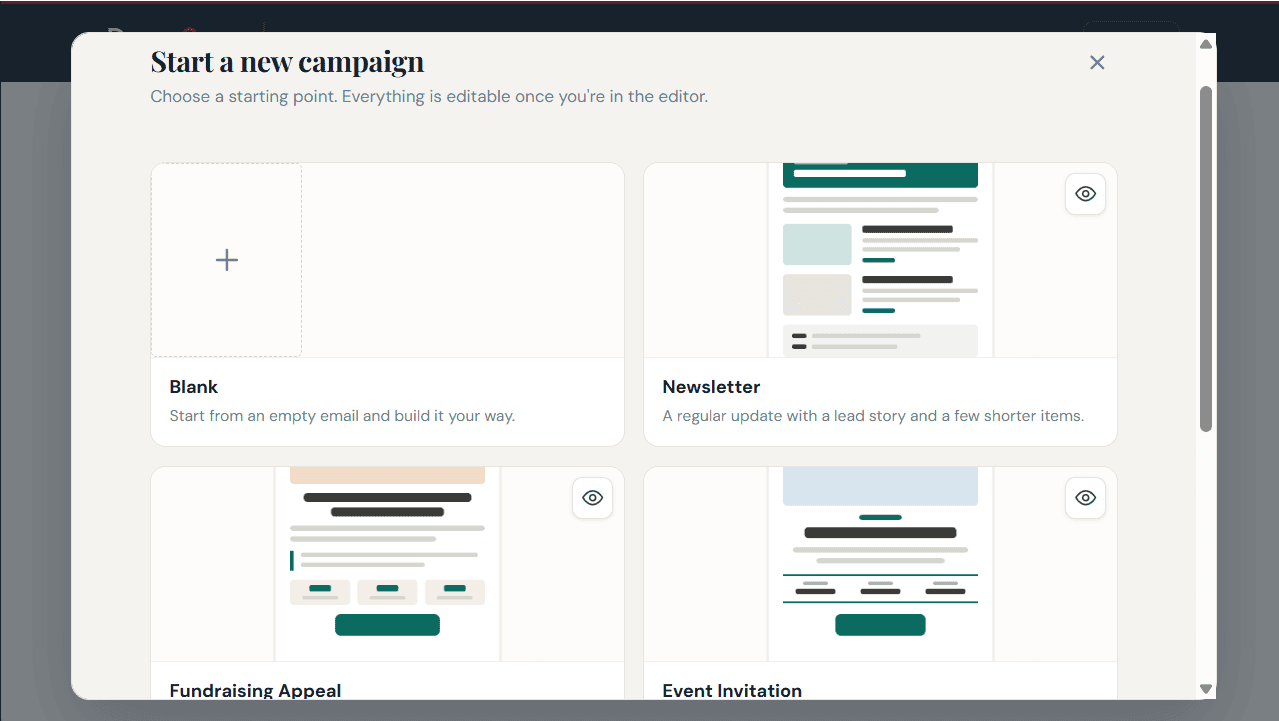
Start with a template, or a blank page
Say your fall appeal needs to go out next week. Instead of starting from an empty screen, open Campaign Studio and choose a template made for the emails nonprofits send most often:
- Newsletter: one lead story with a few shorter updates beneath it
- Fundraising Appeal: a story up top, suggested gift amounts and a clear Donate button
- Event Invitation: the date, time and place front and center, with an RSVP button
Preview any of them first. When one fits, swap in your logo, your photos and your words. Already have a design in mind? Start with a blank email instead.
Drag, drop and rearrange
Every piece of your email, from the headline to the photo to the Donate button, is a block you can pick up and move. Want the gift amounts higher on the page? Drag them up. Have a second photo of Biscuit settling into his new home? Drop it in below his story.
Your photos and logos are stored right inside Campaign Studio, too. The image you need is in the same place you’re building the email, which makes it much simpler than DonorSnap’s previous image manager.
The editor shows your email as supporters will see it. There’s no code to learn and no waiting on a designer for a small change. Your development director can build a full appeal in an afternoon, and your Tuesday volunteer can fix a typo without calling for backup.

Looks right in Outlook, Gmail and everywhere else
Anyone who has sent an email to a big list knows the problem. It looks perfect in Gmail, then opens in Outlook with images out of place and buttons stretched across the screen. Outlook is famously hard to design for, and plenty of your supporters read their email there every day.
Campaign Studio is designed to work with all major email providers, including Outlook. Your appeal holds its shape whether a supporter opens it in Outlook, Gmail, Apple Mail or Yahoo, with no coding tricks or workarounds on your end.
It’s still smart to give every email one last look before it goes out. Our pre-send email checklist walks you through it in about 10 minutes.
Send it to the right people
Because Campaign Studio is part of DonorSnap, your mailing lists are already waiting in the dropdown. Choose your annual appeal list, your gala guests or your volunteer roster, then pick which email address on file to send to. There’s nothing to export or upload.
Need a more specific group? With DonorSnap’s DataMiner Platinum tool, you can segment your donors for targeted campaigns and send each group the message that fits.
Personal touches come built in, too. A first-name greeting turns “Dear Friend” into “Dear John” for every person on the list.
Catch mistakes before your donors do
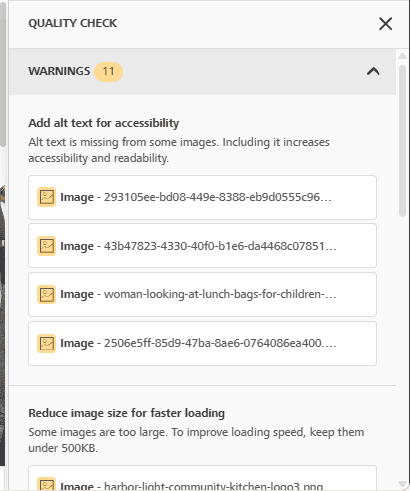
Everyone has a story about the email that went out with a broken link. Campaign Studio’s Quality Check reads through your email before it sends and points out what needs attention:
- Images without alt text, which screen readers rely on to describe a photo
- Links and buttons that don’t lead anywhere
- Text and background colors too close together to read comfortably
- Images large enough to slow the email down
Each warning explains the issue and suggests a fix. Quality Check reads your appeal as carefully on the fortieth draft as it did on the first.
Write the subject line and preview text on purpose
Your subject line and the short preview line beside it decide whether someone opens your email. If you skip the preview text, many email programs grab the first words of your email instead, which is often something like “View this email in your browser.”
Campaign Studio gives you a place to write both. Think of the subject as your headline and the preview text as the sentence that keeps someone reading. “43 animals are waiting” gets attention. Add “Here’s what $25 does for one of them” and you’ve given readers a reason to click.
Send now, or schedule it for later
Send right away for breaking news or a last-minute reminder, or schedule your email for the morning of GivingTuesday while you’re still on your first cup of coffee. Plans change, and scheduled emails can be canceled any time before they go out. A sending meter on your dashboard keeps track of how many emails you’ve sent this month.
See what worked, and why
Open rates, click rates and bounce rates only help if you know what they mean. Campaign Studio’s Results page reports each number and then tells you how it measures up: whether your open rate is strong, or whether bounces are climbing high enough that a few addresses need cleaning up.
After a few campaigns, patterns start to show. You’ll see which subject lines your supporters open, which stories get them clicking and which lists could use some care before your next big ask.
Try it on your next email
Campaign Studio is available on Wednesday October 28. If you are a DonorSnap user email [email protected] to get started.