We hear it more often than you might expect. A nonprofit team logs into their CRM, enters a few contacts, maybe records a donation or two, and calls it a day. The reporting tab? Untouched. The data? Sitting there quietly, doing nothing.
If that sounds familiar, you’re not alone. In fact, 60% of nonprofit professionals have said they don’t use reporting in nonprofit decision making. But here’s the hard truth: a CRM without reporting is just an expensive address book. And your nonprofit deserves better than that.
The good news? You don’t need to become a data analyst overnight. DonorSnap gives you multiple paths to meaningful reporting, from ready-made reports to AI-powered tools that write queries for you. Let’s walk through how to make reporting a natural part of your workflow, and why the tool you choose makes all the difference.
Why Reporting Matters More Than You Think
Every nonprofit makes decisions every day: which donors to follow up with, which programs to invest in, what story to tell the board, and how to prove impact to funders. Without reports, those decisions are based on gut instinct. With reports, they’re based on evidence.
Consider a few scenarios where a five-minute report could change the trajectory of your organization:
Donor Retention: You discover that many of your first-time donors from last year never gave again. Now you know exactly who to re-engage, and when. The data does not just show you the problem — it hands you the action plan.
New Donor Cultivation: You pull a list of everyone who gave for the first time in the last 90 days. Now you can make sure each one receives a thoughtful, personalized welcome experience that turns a single gift into a lasting relationship. A strong new donor onboarding strategy can make all the difference — learn how to welcome and retain new donors here.
Campaign Progress: Midway through your year-end fundraising push, you run a quick report to see where you stand against your goal, which segments have responded, and who has not been reached yet. You still have time to adjust your strategy and finish strong.
Major Donor Cultivation: Using RFM reporting, you identify donors who give frequently, have given recently, and whose cumulative giving puts them in your top tier. These are your most engaged supporters — and they may be ready for a deeper conversation. Flag them for personal outreach from your executive director or development team and start building the kind of relationship that leads to a major gift.
Periodic Comparison Reporting: You compare donation totals from two different time periods and spot a meaningful spike following your spring event. Now you have data to back up the case for investing in that event again next year, and a benchmark to measure against.
Year-End Appeals: You segment your donor list by giving level and lapsed status to personalize your outreach. Higher-touch messaging goes to your most engaged donors, re-engagement notes go to lapsed supporters, and response rates climb across the board
When done correctly, reporting helps your data work for your mission and take the guess work out of your planning.
Not All Tools Are Built for This
Not all fundraising tools are created equal when it comes to reporting, and the difference matters more than most nonprofits realize.
Free and Low-Cost Platforms Have Limits
In recent years, a wave of free or low-cost fundraising platforms has made it easy for organizations to collect donations online. These tools are appealing, especially for smaller nonprofits watching every dollar. But “fundraising platform” and “nonprofit CRM” are not the same thing, and reporting is often where that gap becomes painfully clear. Many of these platforms are built primarily around payment processing and campaign pages. Reporting, if it exists at all, tends to be surface-level: total donations received, a basic transaction list, maybe a campaign summary. Anything more detailed often sits behind additional paid tiers or is simply unavailable.
Collecting Donations Is Not the Same as Understanding Your Donors
Organizations using these tools eventually hit a ceiling. They can collect money, but they cannot easily analyze it. They can see that a donation came in, but they cannot tell you whether that donor gave last year, how their giving has changed, or whether they are at risk of lapsing.
A true nonprofit CRM is designed around the full donor lifecycle. Reporting is not an add-on. It is part of the foundation. That is the difference between a tool that helps you collect donations and a tool that helps you grow your mission.
What to Look for in a Nonprofit CRM’s Reporting Capabilities
If you are evaluating your current tools or considering a switch, here are the reporting capabilities that should be non-negotiable:
- Standard reports built in from day one. You should not need to build a custom report just to see how much you raised last quarter. Pre-built reports for donations, donor activity, pledge tracking, and campaign summaries should be ready and waiting, no configuration required.
- Custom reporting without requiring technical skills. Your team should be able to filter, sort, and segment data based on the specific questions your organization is asking, without needing a developer or a spreadsheet workaround.
- The ability to identify trends over time. Retention rates, year-over-year giving comparisons, lapsed donor identification, these are the reports that move organizations forward. If your current tool cannot surface them easily, you are making decisions with incomplete information.
- Advanced analytics that grow with you. As your organization matures, your questions get more complex. Your reporting tools should be able to keep up.
DonorSnap is built to meet all of these needs natively, meaning all the tools work within the system without any complicated workarounds.
Five Steps to Make Reporting Easy and Meaningful
1. Start with the Standard Reports You Already Have
DonorSnap comes loaded with pre-built reports designed for the questions nonprofits ask most. Donation summaries, contact lists, pledge tracking, event attendance, they are already waiting for you under the Reports tab. You do not need to build anything from scratch.
Try this today: Open DonorSnap, go to Reports, and run the “Donations Received Summary” report for the last 12 months. That single report will give you more insight than most board presentations require.
2. Pick Three Numbers That Matter to Your Organization
Reporting becomes overwhelming when you try to track everything. Instead, identify just three metrics that connect to your mission and strategic goals. For many nonprofits, a great starting point is:
- Total dollars raised (this year vs. last year)
- Number of active donors (and how many are new vs. returning)
- Donor retention rate (what percentage of last year’s donors gave again this year)
Once you know your three numbers, pulling them becomes a habit, not a chore.
3. Go Deeper with DataMiner Platinum
When the standard reports do not quite answer your specific question, DonorSnap’s DataMiner Platinum tool lets you build custom reports by selecting fields, setting filters, and sorting results, all without writing a single line of code. Think of it as a powerful search engine for your own data.
Want to find every donor in a specific zip code who gave more than $500 last year but has not given yet this year? DataMiner Platinum can do that in a few clicks.
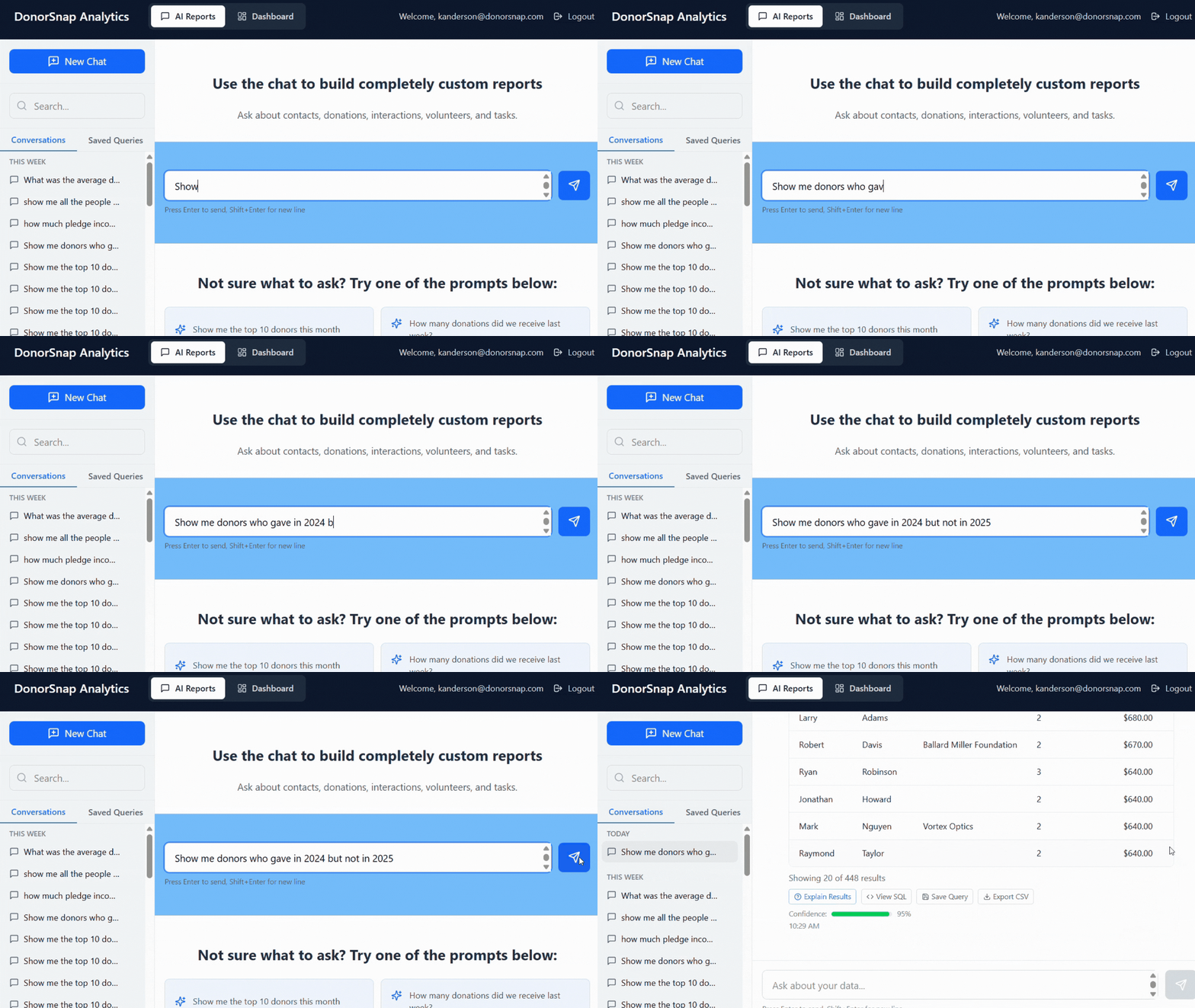
4. Let AI Do the Heavy Lifting with DonorSnap Analytics
Here is where it gets exciting. If you have ever thought, “I know the question I want to ask, but I do not know how to build the report,” DonorSnap Analytics is built for you.
DonorSnap Analytics is an AI-powered SQL report writer that works as an add-on to your DonorSnap account. Just type a question in plain English, like “Show me all donors who gave over $1,000 in 2025 but have not donated yet in 2026,” and the AI builds the query, runs it, and returns your results. No technical knowledge required.
DonorSnap Analytics Highlights:
- Ask questions in plain English, no SQL knowledge needed
- Get answers in seconds, not hours
- Explore your data in ways standard reports cannot
- Available as a monthly add-on to any DonorSnap plan
If your team has been avoiding reporting because it felt too technical, DonorSnap Analytics removes that barrier entirely.
5. Put Reporting on the Calendar
The organizations that get the most from their CRM are not the ones with the most sophisticated reports. They are the ones who look at their data regularly. Set a recurring monthly appointment, even just 30 minutes, to pull your key reports and review them with your team. You can also schedule many of DonorSnap’s pre-built reports to email out on a regular basis.
Pro tip: Schedule your reporting session the week before board meetings. You will walk in prepared, confident, and armed with the numbers that matter.
Which Reporting Path Is Right for You?
DonorSnap gives you options so you can match your reporting approach to your comfort level and needs:
| Option | Best For | Skill Level |
| Standard Reports | Quick answers to common questions | Beginner |
| DataMiner Platinum | Custom queries with filters and field selection | Intermediate |
| DonorSnap Analytics | Ask questions in plain English; AI writes the query | Any level |
Your Data Is Already Telling a Story
The information sitting in your DonorSnap account right now is full of insights about your donors, your programs, and your impact. Reports are simply the way you listen to what that data has to say.
You do not need to become a data expert. You just need to start. Run one standard report this week. Identify your three key metrics. And if you want the fastest, easiest path to answers, give DonorSnap Analytics a try and ask your data a question in plain English.
The nonprofits that know their numbers are the ones that grow their impact. And that is what this is all about.
Learn more about DonorSnap Analytics here.